
For a list of BASHing data 2 blog posts see the index page. 
Where there's a shell, there's a (usually simpler) way
Something I've learned from the wonderful Rosetta Code website is that there are lots of different ways to solve problems with code. They all work, and which one you use depends more on your programming language preferences and requirements than on the shortness of the solution, or its ability to be generalised as an algorithm.
I remembered all that when looking at a 2006 blog post on one of Donald Knuth's algorithms. The author first builds a 30+ lines-of-code string permuter in C# ("EnumerablePermuter"), then demonstrates how it works with
string[] nouns = new string[] { "cat", "dog" };
string[] verbs = new string[] { "sniffs", "eats" };
(new EnumerablePermuter()).VisitAll(nouns, verbs, nouns);
To get
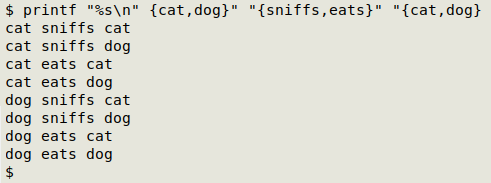
cat sniffs cat
cat sniffs dog
cat eats cat
cat eats dog
dog sniffs cat
dog sniffs dog
dog eats cat
dog eats dog
But you get the same result with a BASH one-liner:
printf "%s\n" {cat,dog}" "{sniffs,eats}" "{cat,dog}
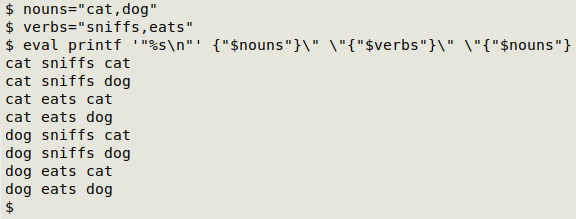
You can also generalise the permutation with "nouns" and "verbs" variables, as in the blogger's problem:
nouns="cat,dog"
verbs="sniffs,eats"
eval printf '"%s\n"' {"$nouns"}\" \"{"$verbs"}\" \"{"$nouns"}
For an explanation of how the command works, see this BASHing data post.
Sure, the C# code might be a better fit in some programming environments at some stage in a data-wrangling process. But for most of the data work I do, reaching for a BASH shell and tweaking a few standard shell tools is the quick, easy and reliable way to get a desired result. Coding a general solution or looking online for a general algorithm would be a waste of my time and effort.
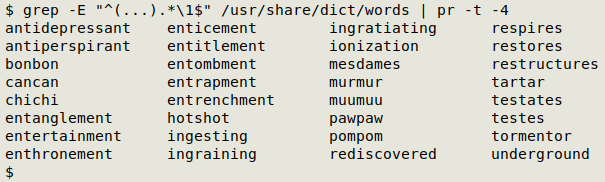
The search for a coding solution can sometimes look like a kind of code golf. A favourite example of mine is this Rosetta Code task: in a given dictionary, find all words of length greater than 5 letters whose first 3 and last 3 letters are the same. Have a look at that Rosetta Code page to see how complicated some of the answers are, in various programming languages. With my /usr/share/dict/words wordlist, I'd just use GNU grep and a little regex in BASH:
grep -E "^(...).*\1$" [wordlist]
Next post:
2025-12-12 Serial numbering based on changing values in another field
Last update: 2025-12-05
The blog posts on this website are licensed under a
Creative Commons Attribution-NonCommercial 4.0 International License